AI Chatbot Handling Up to 85% of Routine Enquiries
Mad Devs built an AI customer support chatbot that acts as a second support shift, answers routine enquiries from an approved knowledge base, and reduces repetitive work for the team.
Overview
Mad Devs developed an AI chatbot for a service business receiving recurring questions, booking enquiries, and customer messages outside working hours.
The chatbot detects the customer’s language and intent, understands informal and mixed-language messages, and answers using information approved by the business. When a request requires professional judgment, missing information, or manual action, the conversation moves to an employee.
10+ businesses already use the chatbot
From clinics, beauty and wellness services to furniture retailers, design studios, real estate, education, and other enquiry-driven businesses, the chatbot helps handle recurring customer questions across messaging channels.
Result at a glance
The business challenge
The customer service team regularly received the same questions about services, prices, schedules, locations, specialists, and booking conditions.
These enquiries were important to customers but often did not require professional expertise. Handling them manually took time away from conversations that needed judgment, empathy, or access to another business system.
Messages also continued outside working hours. Customers could contact the business in the evening or at the weekend and wait until an employee became available.
The business needed the chatbot to act as a second support shift. While employees were offline, it would handle approved routine enquiries, provide immediate information, collect the details needed for follow-up, and transfer unresolved conversations to the team for the next working period.
A conventional scripted chatbot would not have solved the problem. Customers used different languages, combined languages in one message, wrote informally, made spelling mistakes, and described services without knowing their official names.
Why choose an AI chatbot
AI chatbot gives you more control over support economics, automation rules, and integrations than a fixed customer-support platform.
What Mad Devs delivered
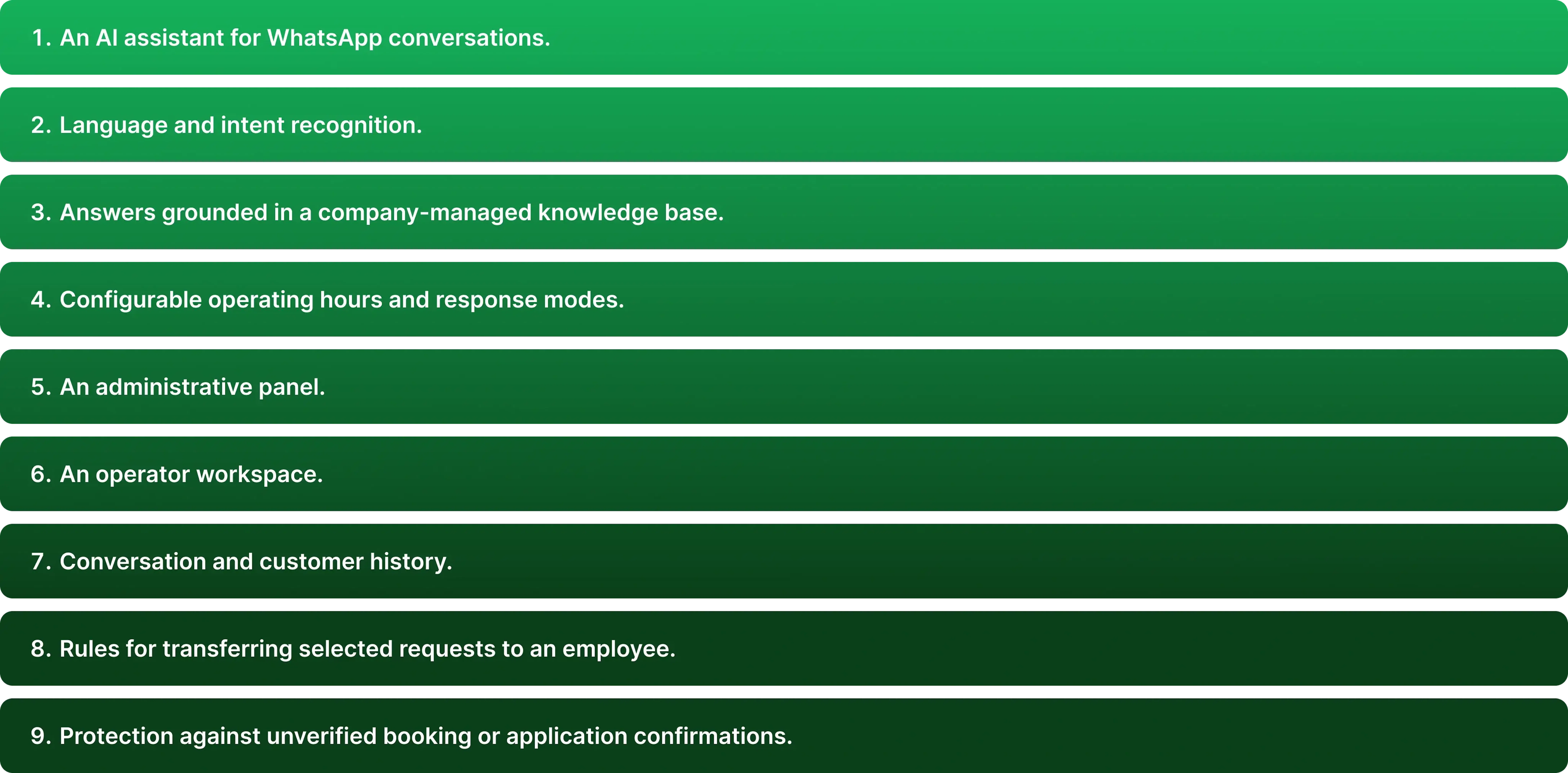
Mad Devs developed a complete first-line support system rather than a standalone question-and-answer widget. The delivered solution included:
How the chatbot works
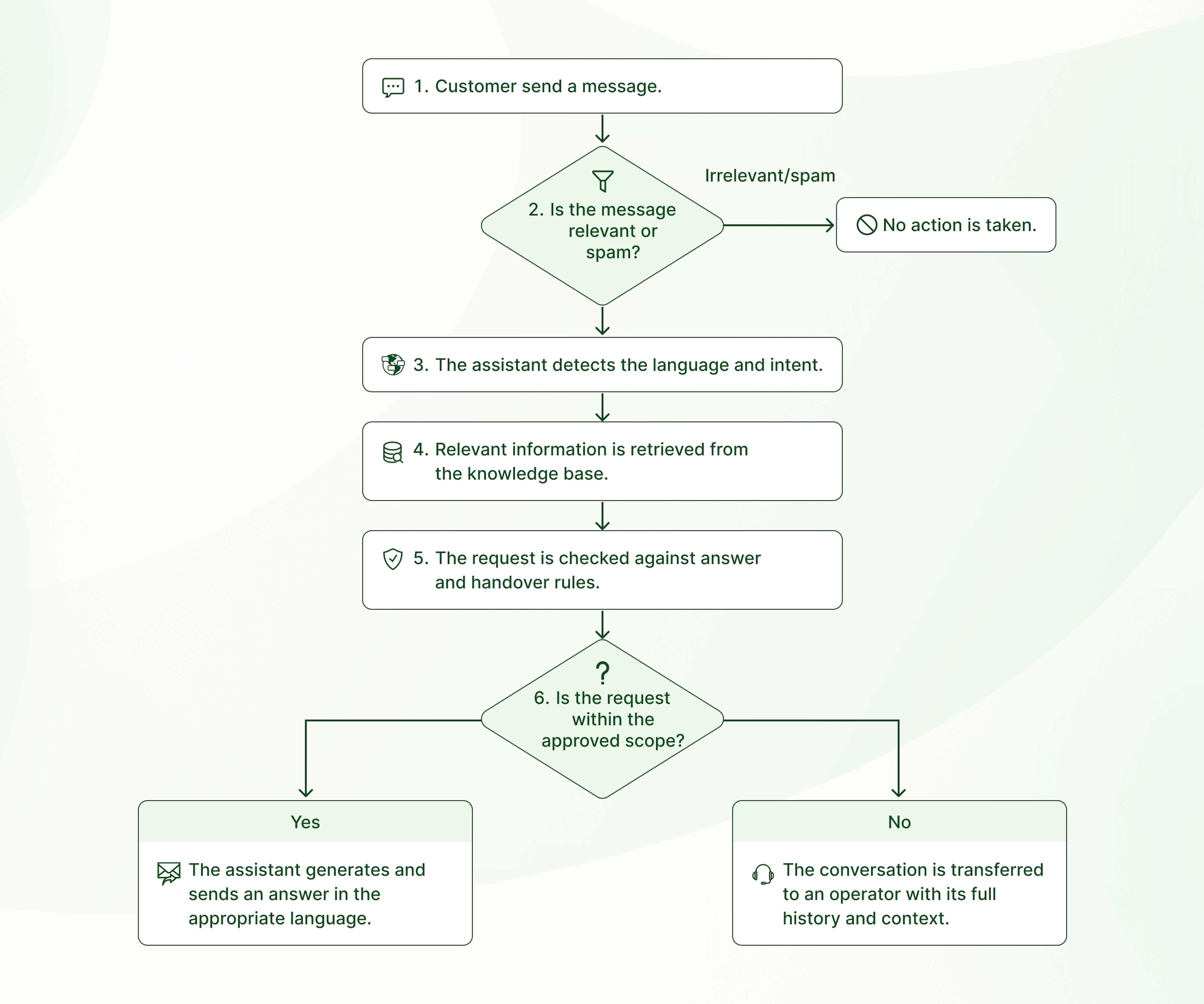
The chatbot can work in WhatsApp, Telegram, Instagram, website chat, and other supported customer channels. Across all channels, it uses the same knowledge base and business rules to understand each request, provide an approved response, or transfer the conversation to an operator.
|
Need a ready-made chatbot for customer conversations? Enji Chat brings conversations from your website, WhatsApp, Telegram, and Bitrix24 into one workspace. AI answers using your business information, and your team can take over whenever a conversation needs a person. Explore Enji Chat → |
Understanding natural customer messages
Customers did not need to select a language or follow a fixed chatbot menu.
The chatbot analysed the conversation to determine the customer’s preferred language and intent. It could interpret:
- mixed-language messages;
- slang and informal wording;
- abbreviations;
- spelling mistakes;
- descriptions that did not use the official service name.
It distinguished between routine questions, booking enquiries, complaints, spam, requests for an operator, and conversations outside its approved scope.
This allowed customers to describe what they needed in their own words.
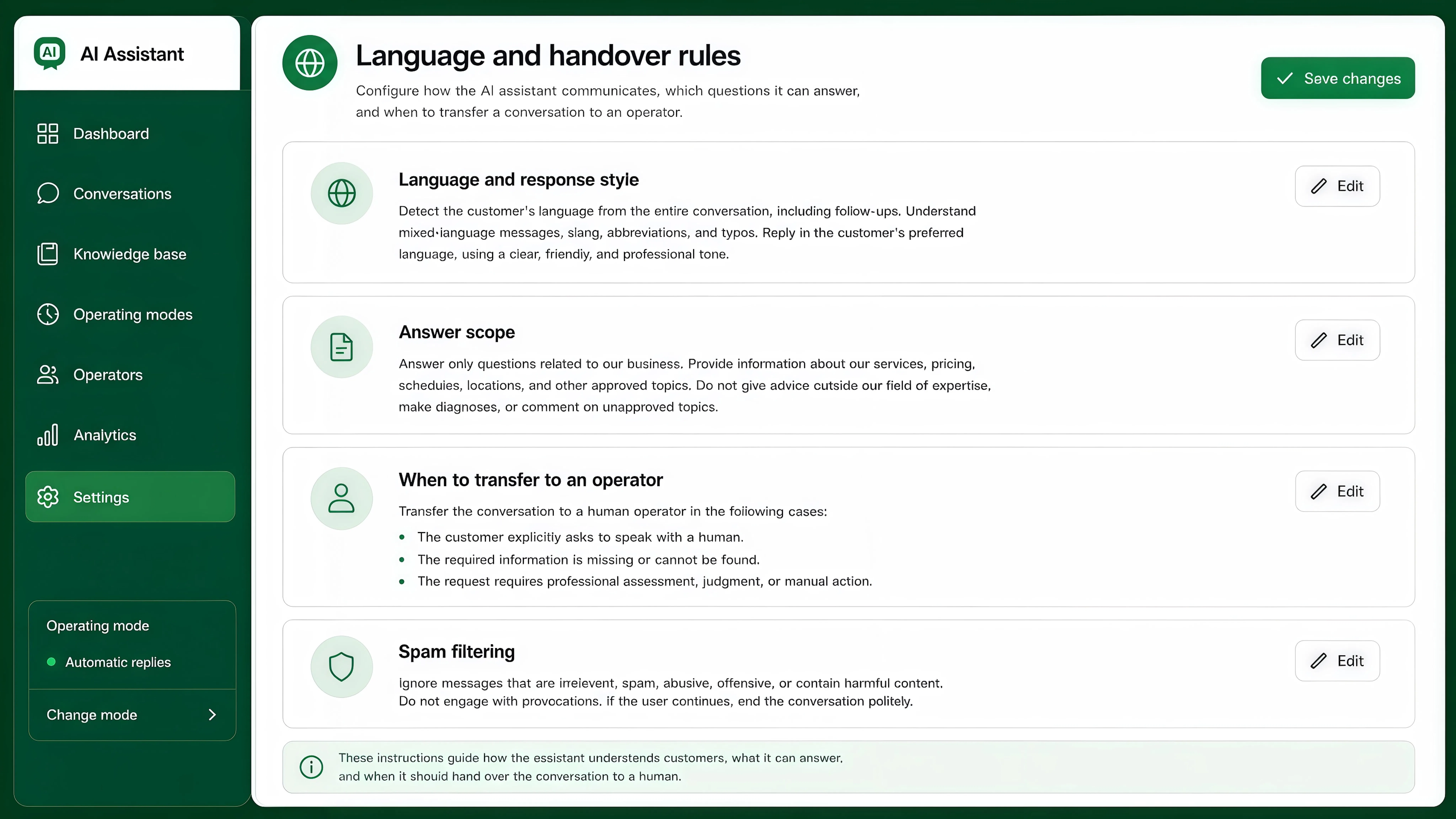
Administrators define how the chatbot communicates, which questions it may answer, and when it should transfer a conversation to an employee.
Answers grounded in a business-managed
knowledge base
The chatbot answered from a central knowledge base containing approved information about services, prices, schedules, locations, specialists, booking rules, preparation instructions, restrictions, and frequently asked questions.
Employees could edit the content directly or upload existing documents through the administrative panel.
When a price, schedule, policy, or service description changed, the business updated it in one place. The chatbot then used the revised information in future conversations without requiring a new scripted flow or code change.
This reduced dependence on developers and helped keep customer information consistent across AI and human support.
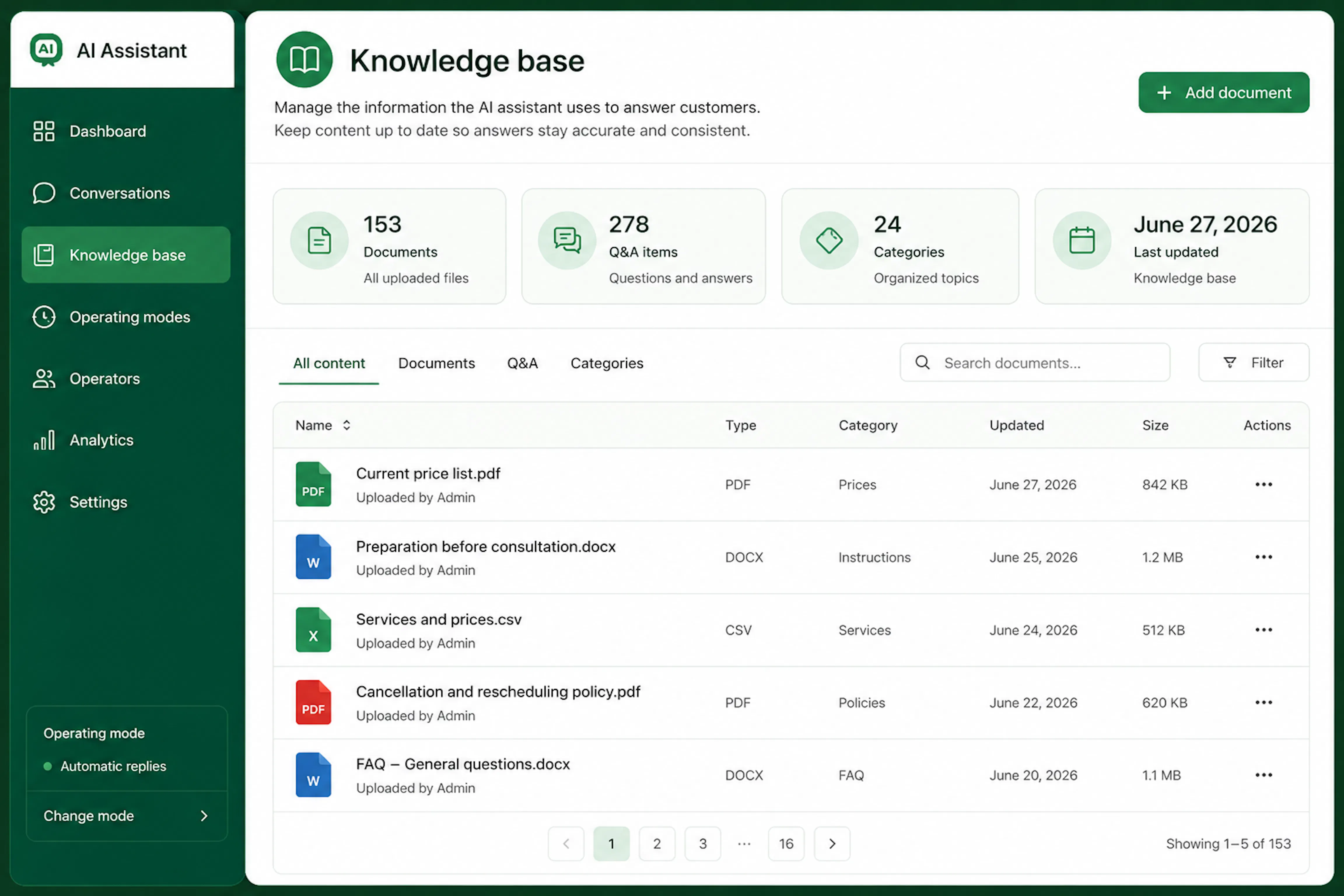
Employees update business information and supporting documents without changing chatbot scripts.
Two interfaces for two different roles
The system included separate functionality for administrators and customer support operators.
Administrative panel
The administrative panel was designed for employees responsible for chatbot configuration, business information, access, and operating rules.
Administrators could:
- enable or disable the chatbot;
- select its operating mode;
- configure working days and hours;
- define when AI or operators respond;
- edit the chatbot name and response settings;
- manage language and communication instructions;
- define the approved answer scope;
- configure operator handover conditions;
- configure spam and irrelevant-message handling;
- maintain the knowledge base;
- upload and remove supporting documents;
- manage administrators and operators;
- review WhatsApp connection status and settings.
The administrative panel controlled how the system behaved. It was not intended for handling individual customer conversations.
Configurable operating modes
Administrators could choose between four modes.
AI off
Automatic replies are disabled. Employees handle all conversations manually.
Automatic replies
AI acts as the first line of support and transfers conversations that fall outside its approved scope.
Operator first
Employees respond first. AI can provide support when required.
Scheduled AI support
Employees handle conversations during working hours, while AI answers approved routine questions outside those hours.
The business could set different working hours for each day of the week and adjust or switch the active mode at any time when operational needs change.
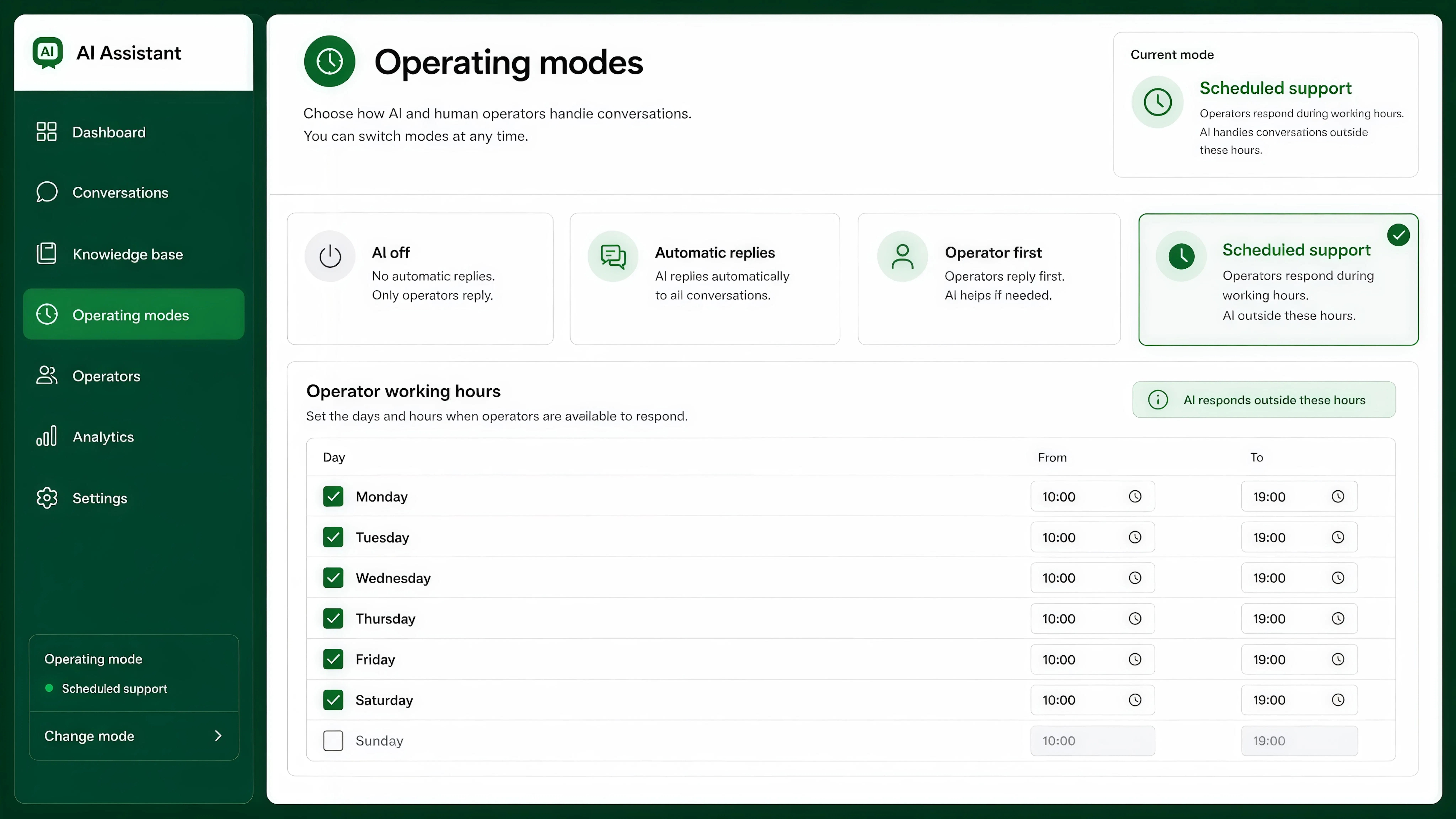
The business could set different working hours for each day and change the active mode when needed.
Operator workspace
The operator workspace was designed for employees handling customer conversations.
Operators could:
- see active conversations in one inbox;
- review customer details and conversation history;
- see whether a chat was handled by AI or required attention;
- take ownership of a conversation;
- reply to the customer manually;
- use an AI-generated draft;
- return the conversation to AI mode;
- close the conversation;
- review AI usage for the selected chat.
When an operator took control, automatic customer-facing replies stopped. This prevented the customer from receiving parallel or conflicting answers from AI and an employee.
The operator received the full conversation history and could continue without asking the customer to repeat the request.
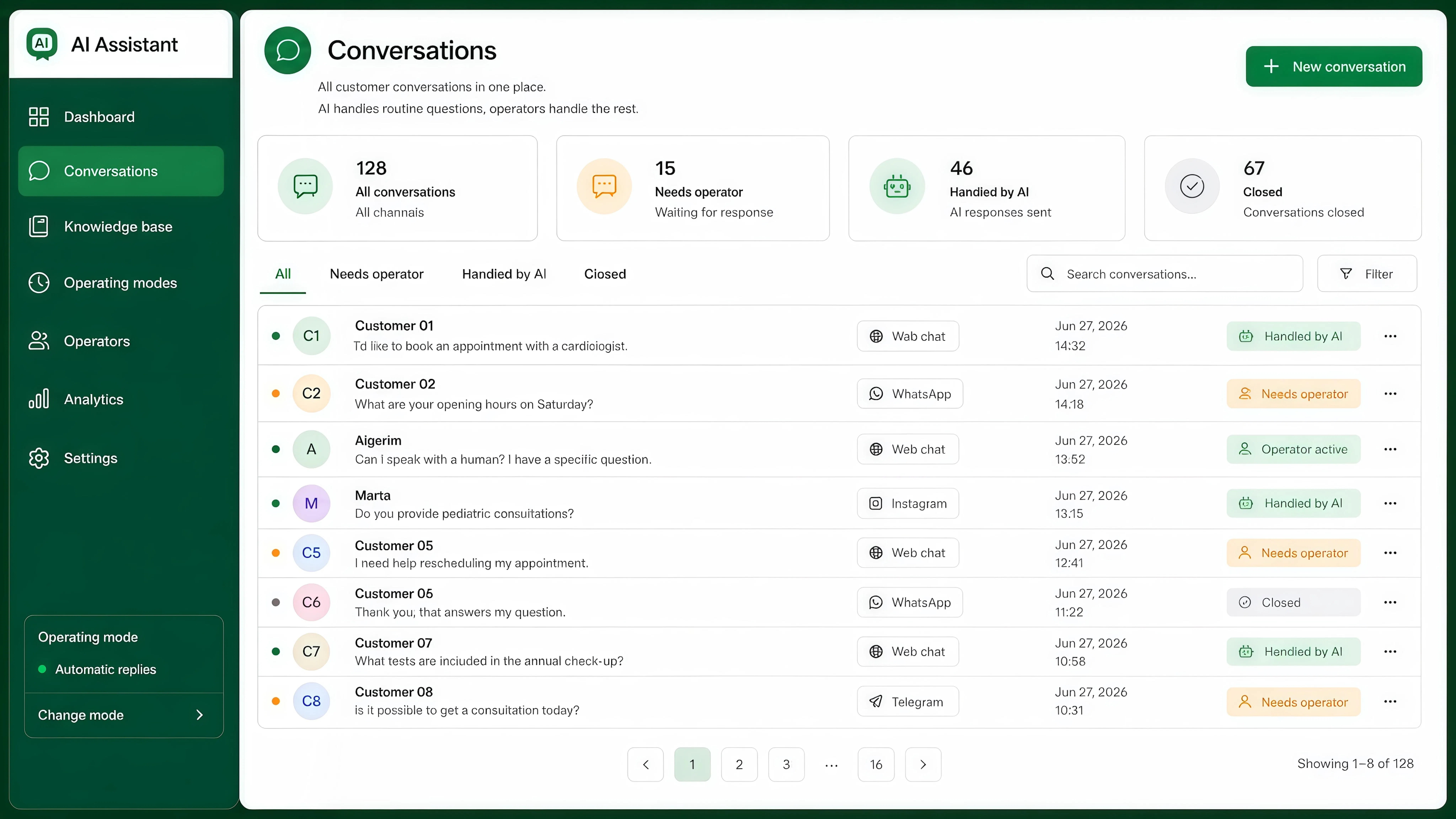
Operators see which conversations were handled by AI, which need attention, and which are already being handled by an employee.
Human control and safe automation
The system was designed to keep automation within defined operational boundaries. Requests requiring verification, professional judgment, or manual action were transferred to an employee.
Sensitive requests move to an operator
The chatbot transferred a conversation when:
- the customer asked to speak to a person;
- the required information was unavailable;
- the request fell outside the approved scope;
- professional assessment was required;
- the situation was sensitive or disputed;
- an action had to be completed manually.
For the delivered healthcare-related workflow, the chatbot was restricted from making diagnoses, recommending treatment, replacing a consultation, or minimising potentially urgent symptoms.
No confirmation without a system response
The chatbot did not claim that an appointment or application had been completed unless the relevant business system confirmed it.
Without a booking integration, it could collect the customer’s preferred date, requested service, and contact details. It then explained that an employee would confirm availability.
Without a booking integration
We have received your preferred date and contact details. A member of the team will confirm availability.
With an integration and successful confirmation
Your appointment has been confirmed for Tuesday at 10:30 am.
This created a clear boundary between collecting information and completing a verified business action.
Answers stay within approved information
The chatbot used the company’s knowledge base as its factual source. If the information required to answer a question was unavailable, it did not fill the gap with an assumption and transferred the conversation to an operator instead.
Access and deployment controls
Administrators managed chatbot settings, users, and business information, while operators worked with customer conversations.
API credentials were stored as protected secrets. Test and production environments were separated, and automated checks ran before deployment.
AI data processing
The chatbot used the OpenAI API to interpret messages and generate responses. Only the context required for the current request was sent to the model.
OpenAI states that API inputs and outputs are not used to train its models by default. Additional retention controls may be available depending on the organisation and API configuration.
Get a business-ready AI chatbot in under two weeks
Your chatbot is configured around your business, including its services, knowledge base, customer scenarios, response rules, and tone of voice. A typical setup can be completed in under two weeks for a focused scope.
Business setup and AI tuning
We configure the chatbot around your services, business information, customer questions, supported languages, escalation rules, and response style.
Testing and refinement
Before launch, we test the chatbot against real customer scenarios, including unclear requests, informal wording, missing information, operator handover, and cases where a human should take over.
Launch and post-launch warranty
After testing, the chatbot is released to production and followed by a one-week warranty period for issues within the agreed scope.
Timelines may increase for complex integrations, custom workflows, data migration, or regulated use cases.
How can the solution be extended
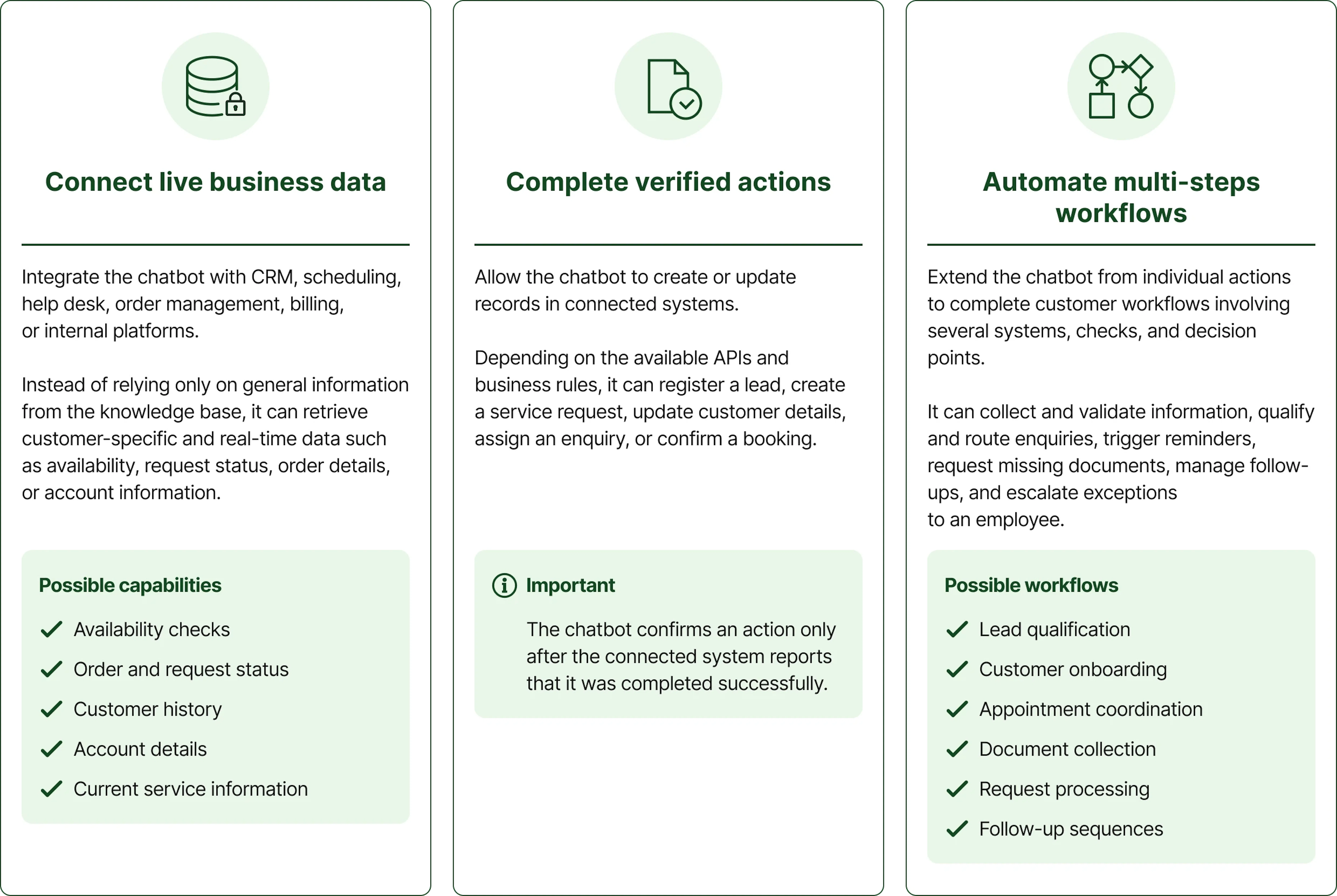
The chatbot can be extended beyond answering routine questions. By connecting it to business systems, it can retrieve live data, complete verified actions, and support multi-step customer workflows.
More AI solutions we have delivered
These examples show how we apply AI to customer support, workflow automation, and connected business processes across different products and industries.

